Monday, June 14, 2010

Visual Studio 2008 - ASP.NET Web DB Application 4

MVC2DCatalog - The MVC2 Framework Way

Other sections related to the same discussion:

Notice: To be able to reproduce and run this sample, you should be sure you read and followed the chapters present in "Visual Studio 2008 - Ways to Start an ASP.NET Web Database Application - General Considerations". Also, you may read the "dcJQuery - The jQuery AJAX Way" section to get a better idea regarding ASP.NET AJAX apps based on jQuery javaScript library.

General Considerations
The MVC2 Framework (MVC2) refers to the Model View Controller way a web application may work by using the ASP.NET framework (FX). The MVC2 is an independent functioning framework, so we may say we have a framework (MVC2) in another framework (FX). MVC2 is not included in the FX 3.5 distribution, so you will have to install it (see "Visual Studio 2008 - Ways to Start an ASP.NET Web Database Application - General Considerations", prerequisites section).
The difference between MVC2 and all the 3 solutions we discussed before is a structural one. Practically, now, the database is not queried using SQLDataSources, but it is represented by the Model (M), the "code behind" page is represented now by the Controller (C), while the ASPX page will be represented by the View (V). As an image, the data from the database will be loaded into Models by the Controller, they will become available for the Controller which will process and standardize the data; data will then be sent and displayed to the user by using Views.

Notice: Why is it called MVC2 ? Because is the second version of MVC framework of Microsoft. Although MVC is new for Microsoft, this structural model was developed and implemented some time before by Java based frameworks like ASF, JSF, Struts, Tapestry, aso. The MVC2 looks more like Struts 2 from Apache Foundations, in the sense that it is "action oriented", not "component oriented" as it is JSF for example.

How MVC2 Framework works ?
In order to load data in the Models, a persistence layer is used. In our case, LINQ (http://msdn.microsoft.com/en-us/library/bb397933.aspx) is used to get the data into Models which will be offered to Controllers through queryable interfaces (iQueryable). LINQ is somehow similar with SQL, but it allows server code (VB.NET, C#, aso) to interfer within its query syntaxes. The result of a LINQ query may be seen as a Recordset or Resultset Iterator, in the sense that you may browse its content with methods like First(), Last(), Next(); an important thing is that it may be cast-ed to a Collection like List.
The Controller is a set of ActionResults. An ActionResult is called by a FORM action event, it executes at the Controller level and then it is output to the user at the View level. As in the case of the discussed jQuery approach, at the View level we cannot use VS2008 specific ASP controls because of their internal events, but Microsoft has developed a set of new HTML helpers to be used by MVC2 for the View (see this: http://weblogs.asp.net/scottgu/archive/2010/01/10/asp-net-mvc-2-strongly-typed-html-helpers.aspx).

The MVC2 Framework Way sample
In my sample I used an "ASP.NET MVC2 Web Application" project template. To the "dcatalog" database tables I linked 3 HTML tables. The first table brings data from the "disk" table. The table Model is generated with the help of LINQ. A service ("/Services/DiskService.cs" interface) is implemented ("DiskServiceImpl.cs") to "ListAll()" the records of "disk" table. The "/Services/DiskService.cs" service is executed at the Controller level and it brings data from "disk" table when the application calls the "Disks()" ActionResult from the "/Controllers/HomeController.cs" Controller. The data from "DiskServiceImpl.cs" is passed to Controller by using the "dependency injection" pattern (see Spring Framework). Then it is output by the "/Views/Home/Disks.aspx" View.

Notice: It is important that the View to have the same name as the ActionResult from the Controller.

Then, a more complex Model is formed with the help of LINQ. It contains the "disk_items", "disk_genre", "disk_audio", "disk_video", "disk_games", aso, like in the figure:


To obtain "disk_items" we fire a radio button from the "disks" table radio buttons group and the "DiskItemsByIdDisk(int id)" ActionResult from the "HomeController.cs" Controller will be called, the Model data will be extracted with the help of "DiskSubitemService" service from the "disk_items" table and then output to "/Views/Home/DiskItemsByIdDisk.aspx" View.
A LINQ generated Model may consist of several database tables, the LINQ Model being responsible for GET-ing or SET-ing the data from or in the tables.

For the "Subitems", in order to get for example the "disk_audio_genre" or "disk_audio_type", I have created internal applications Models (kind of Plain Old Object) under the Models Namespace, that will keep all the "disk_audio" data and also the genre and the type. You may find these internal Models in "/Models/Disk_subitems_Full_Model.cs".
To obtain "disk_audio" subitems, when we click a radio from "disk_items" table, the "DiskSubitemsById(int id)" ActionResult from the "/Controller/HomeController.cs" Controller will be called, a comparison will be made to establish if the "disk_item.id" = "disk_audio.id_item" and if so, the data will be put in the the "Disk_Audio_Ext" internal Model and then extracted from it into an iList with Disk_Audio_Extalements. Then, the Controller outputs the ViewDatas to the user by the "/Views/Home/DiskSubitemsById.aspx" View.

Notice: as a consequence of the database design, in order to display the "Subitems", the Controller establishes more "ViewData" objects that are further managed by the View.

The destination objects in which the Views are loaded was established by jQuery actioned HTML "DIV" elements. More exactly, when we click a radio, a View outputs a HTML code with the help of jQuery "$.ajax()" function into a DIV HTML element (see for example the javaScript at the top of "/Views/Home/Disks.aspx").

Below there is an image with the Solution Explorer of this MVC 2 app:


Below there is an image with MVC2DCatalog app working:

Here is the source code of this application:
MVC2DCatalog.zip

Notice: In order to proper configure the IIS to deploy MVC2 applications, be sure you have the "Global.asax" configured in the same manner as in this application. It is important that the routes to be mapped in this way, in order for the MVC2 Framework to work properly. Note also how the HTTP query string is formed in case of MVC2 applications.

Conclusion:
The MVC2 is by far the most robust and well modularized approach to design a VS2008 web application. However, VS2008 has a lack of resources at the View level and it doesn't offer complex ASP controls as in the case of the previous 3 Solutions. You will have to build your own controls, but you have the help of jQuery objects.

Visual Studio 2008 - ASP.NET Web DB Application 3

dcJQuery - The jQuery AJAX Way

Other sections related to the same discussion:


Notice: To be able to reproduce and run this sample, you should be sure you read and followed the chapters present in "Visual Studio 2008 - Ways to Start an ASP.NET Web Database Application - General Considerations". Also, you may read the "DCatalogAjax - The Microsoft ASP.NET AJAX Way" section to get a better idea regarding ASP.NET AJAX apps.

General Considerations
The jQuery AJAX (JQ-AJAX) refers to the jQuery AJAX way a web application may work by using the ASP.NET framework (FX).
As a difference regarding the ASP.NET AJAX (FX-AJAX), the JQ-AJAX uses the jQuery HTTP callbacks to the server in order to change portions of a page. There are many jQuery callback functions that communicate with the server to reload those portions of the page where AJAX is applied, and these are the specific jQuery functions: $.load(), $.ajax(), $.getJSON(). All of these functions may be configured to GET or POST the content of a FORM to the web server. JQuery is an AJAX enabled javaScript library that provides own objects to standardize the javaScript interpretation gap between the web browsers by imposing object functions and methods that comports the same on all browsers.

How jQuery AJAX works ?
When rendered by the FX, the ASPX page will contain several jQuery functions that are "waiting" for the FORM fields events in the "ready" AJAX state. On the HTML page, when the respective FORM field is rendered, then its events will be rendered, too. If an event of the FORM field is fired then the jQuery code associated to that event will run. That code may consist of interactions within the existent fields on the FORM, or it may do an AJAX callback to the server. For example, a "$.load()" callback may load a whole ASPX page by using AJAX, a "$.ajax()" callback may load portions of text, HTML or json scripted code, "$.getJSON()" loads JSON code. JSON is a structured data format written as a javaScript array.
However, regarding the VS2008 controls and ASP.NET, this means that the usual "Post-Backs" are replaced by jQuery callbacks. So, all the internal actions of a VS2008 control may be avoided in order to better manage the jQuery results. For example, an ASP DATA GridView will loose the sort, select, edit, delete, paging actions and they should be redesigned with jQuery. This happens because jQuery is not an VS2008 integrated development medium and VS2008 manages in a different way the callbacks to the server.

The jQuery AJAX Way sample
In my sample I used an "ASP.NET Web Application" project template. To the "dcatalog" database tables I linked 4 ASP DATA Controls : 3 ASP DATA GridView and an ASP DATA DetailsView. The first GridView ("gvDisks") uses the "dsDisks" SQLDataSource to get the "disk" database table content. Then, in the jQuery "ready" state it is waited for the "OnSelectedIndexChanged" event of "gvDisks" which is now represented by a group of HTML radio buttons, instead of the GridView "select" capability. Then, when a radio button is clicked, an $.ajax() jQuery AJAX callback will bring the HTML content of the second GridView named "gvDiskItems" into a HTML DIV element. The same thing happens between the "gvDiskItems" GridView and the 3rd GridView named "gvItem". Then same thing between the "gvItem" GridView and the DetailsView named "detvItemDetails". All these operations are handled by the javaScript function "viewDiskItemsGridView()" from the "/js/disks_view.js" file.
In addition, now there is presented a switch section between "Browse Disks" and "Search Disks" on the starting "Default.aspx" page. The "Search Disks" is not implemented yet, its purpose is to demonstrate jQuery capability of "$.load()" function. The behaviour of this switch is revealed by "/js/Default.js" file which allows the AJAX loading of the "disks_view.aspx" and "disks_search.aspx" pages, by using jQuery $.load() when the user clicks the "Browse Disks" or "Search Disks" buttons.

You may find important design information in "Default.aspx", "disks_view.aspx", "disk_items_view.aspx", "disk_subitems_view.aspx", "disk_subitem_details.aspx" and in their coresponding "code behind" files.

Here is an archive with the source of this sample:
MasterDetailJQuery.zip

Notice: when I started to work at this sample, I named the Solution Project as "MasterDetailJQuery", and then I refered at it as "dcJQuery".

Below there is an image with dcJQuery app working:


Notice:
VS2008 has a convention in which if the ASPX file has a user defined name, then the "code behind" will be named [ASPX_filename].cs. You may find also a [ASPX_filename].designer.cs file that is updated whenever you add a control to the ASPX page from the "design" mode. If you want to internally modify the control added in "design" mode, then you shoul delete its declaration from [ASPX_filename].designer.cs and move it to [ASPX_filename].cs, thus having full access to that control and the ability to extend the capabilities of it.

Conclusion:
Even if jQuery is known as doing fast AJAX callbacks, this is not a good approach from the VS2008 point of view. You may not use the power of the ASP controls, because they are managed in a different way and you will have to write jQuery events for all the internal events of these controls (for instance the ASP DATA GridView internal "sort", "select", aso events). Luckily, you may use jQuery complex designed controls.

Visual Studio 2008 - ASP.NET Web DB Application 2

DCatalogAjax - The Microsoft ASP.NET AJAX Way

Other sections related to the same discussion:


Notice: To be able to reproduce and run this sample, you should be sure you read and followed the chapters present in "Visual Studio 2008 - Ways to Start an ASP.NET Web Database Application - General Considerations". Also, the discussion at "DiskCatalog - The Classic Post-Back Way" may help you getting a better idea regarding ASP.NET Web Applications.

General Considerations
The Microsoft ASP.NET AJAX (FX-AJAX) refers to the AJAX way a web application may work by using the ASP.NET framework (FX).
As a difference regarding the Classic Post-Back (CPB), the FX-AJAX uses Ajax Post-Backs to the server in order to change portions of a page. I will refer further to these AJAX Post-Backs as AJAX Callbacks. As we said, the CPB reloads the whole page when an action is executed. The FX-AJAX will reload only those portions of the page where AJAX is applied, leaving intact the rest of the page portions.

How ASP.NET AJAX works ?
When rendered by the FX, the ASPX page will contain a JavaScript function named "__doPostBack()", as also CPB contained, but this time it will handle the server requests using AJAX. This is possible by using a "ScriptManager" object that will handle all the javaScript needed for the portions of the page reloaded by AJAX. These portions reloaded by AJAX will be stored in containers named "UpdatePanels". The FORM fields will also be available in a "code behind" server file specified by the FORM "action" attribute. For each FORM included in the ASPX page, we will have in the "code behind" file a "class" container with the name of that FORM that will contain FORM fields properties, the FORM fields events will be represented as class methods, aso. As the content of the ASPX server file is rendered, the FORM fields become accessible for the "code behind" server file which has the possibility to transform the FORM fields accordingly with the written code.

The ASP.NET AJAX Way sample
In my sample I used an "ASP.NET Web Application" project template. To the "dcatalog" database tables I linked 4 ASP DATA Controls : 3 ASP DATA GridView and an ASP DATA DetailsView. The first GridView ("gvDisks") uses the "dsDisks" SQLDataSource to get the "disk" database table content. Then, by using the "OnSelectedIndexChanged" event of "gvDisks" I get the database content of table "disk_items" with the help of SQLDataSource "dsDiskItems" and write it in the second GridView "gvDiskItems". Both, "dsDiskItems" and "gvDiskItems" are stored in an UpdatePanel named "upDiskItems". To reload the content of "udDiskItems" panel, a trigger is assigned to this panel which will asynchronously re-write the "upDiskItems" components when the "SelectedIndexChanged" of the first GridView "gvDisks" fires. This asynchronous AJAX Callback uses the POST HTTP method. The same thing happens between the "gvDiskItems" GridView and the 3rd GridView named "gvDiskSubitems" which is stored in the "upDiskSubitems" UpdatePanel. Then same thing between the "gvDiskSubitems" GridView and the DetailsView named "dvDetSubitems" which is stored in the "upDetSubitems" UpdatePanel.
All the 4 UpdatePanels are javaScript handled by the "ScriptManager1" ScriptManager.

You may find all the 4 ASP DATA Controls on the "Default.aspx" file which you may access in the "source", "design" or mixed view modes. The coresponding "code behind" file will be "Default.aspx.cs".

Here is an archive with the source of this sample:
DCatalogAjax.zip

Below there is an image with DCatalogAjax app working:


Notice:
VS2008 has a convention in which if the ASPX file has a user defined name, then the "code behind" will be named [ASPX_filename].cs. You may find also a [ASPX_filename].designer.cs file that is updated whenever you add a control to the ASPX page from the "design" mode. If you want to internally modify the control added in "design" mode, then you shoul delete its declaration from [ASPX_filename].designer.cs and move it to [ASPX_filename].cs, thus having full access to that control and the ability to extend the capabilities of it.

Conclusion:
This is probably the best approach in order to develop a web application using VS2008. However, it requires special attention while developed; you have to take care, when the UpdatePanels are rendered because only after they rendered you gain access to their content; otherwise, their content is null. Security should be also present on AJAX calls.

Visual Studio 2008 - ASP.NET Web DB Application 1

DiskCatalog - The Classic Post-Back Way

Other sections related to the same discussion:


Notice: To be able to reproduce and run this sample, you should be sure you read and followed the chapters present in "Visual Studio 2008 - Ways to Start an ASP.NET Web Database Application - General Considerations".

General Considerations
The Classic Post-Back (CPB) refers to the simplest way a web application works by using the ASP.NET framework (FX).
The CPB runs at the level of a HTML server page. In VS2008, the page that is rendered by the web server into a HTML page usually has the "aspx" extension (ASPX page). Practically, you have a FORM or more on this ASPX page that includes form fields (or FORM controls): HTML tables, HTML textboxes, ASP DATA GridViews, ASP DATA DataLists, aso. If you chosen to use VS2008 ASP controls, then you should know that any internal action executed by an ASP control (select, sort, insert, update, aso) is made to the server location established by the FORM container attribute named "action". The same happens for all the button controls (HTML buttons, ASP buttons) on that FORM. The FORM action will "post" the FORM content to the server, making available to the server all the data content of the form fields: their name and value pair and the events applied on them. These actions are called Postbacks.

How Post-Back works ?
When rendered by the FX, the ASPX page will contain a JavaScript function named "__doPostBack()" that will send all the FORM field properties and their events to a "code behind" server file specified by the FORM "action" attribute. This "code behing" server file may be programatically written in: Visual Basic .NET, Visual C# .NET, Visual J# .NET, Visual C++ .NET. For each FORM included in the ASPX page, we will have in the "code behind" file a "class" container with the name of that FORM that may contain FORM field properties, while the FORM fields events will be represented as class methods, aso. As the content of the ASPX server file is rendered, the FORM fields become accessible for the "code behind" server file which has the possibility to transform the FORM fields accordingly with the written code.

The Classic Post-Back Way sample
In my sample I used an "ASP.NET Web Application" project template. To the "dcatalog" database tables I linked 4 ASP DATA Controls : 3 ASP DATA GridViews and an ASP DATA DetailsView. The first GridView ("gvDisks") uses the "dsDisks" SQLDataSource to get the "disk" database table content. Then, by using the "OnSelectedIndexChanged" event of "gvDisks" I get the database content of table "disk_items" with the help of SQLDataSource "dsDiskItems" and write it in the second GridView "gvDiskItems". Then, by using the "OnSelectedIndexChanged" event of "gvDiskItems" I get the database content of a multiple query on tables "disk_audio", "disk_games", "disk_kits", aso, and with the help of SQLDataSource "dsItem" I write it in the third GridView "gvItem". Then, by using the "OnSelectedIndexChanged" event of "gvItem" I get the database content of a multiple query on detailed tables "disk_audio", "disk_games", "disk_kits", aso, and with the help of SQLDataSource "dsItemDetails" I write it in the DetailsView "detvItemDetails".

You may find all the 4 ASP DATA Controls on the "Default.aspx" file which you may access in the "source", "design" or mixed view modes. The coresponding "code behind" file will be "Default.aspx.cs". In "Default.aspx.cs" you will find the methods coresponding to the events applied on respective ASP Controls, for example "gvDisks_SelectedIndexChanged() will be available when the "OnSelectedIndexChanged" event of "gvDisks GridView will fire.

Here is an archive with the source of this sample:
DiskCatalog.zip

Below there is an image with this application at "design" time:

Below there is an image with this application working:


Notice:
VS2008 has a convention in which if the ASPX file has a user defined name, then the "code behind" will be named [ASPX_filename].cs. You may find also a [ASPX_filename].designer.cs file that is updated whenever you add a control to the ASPX page from the "design" mode. If you want to internally modify the control added in "design" mode, then you shoul delete its declaration from [ASPX_filename].designer.cs and move it to [ASPX_filename].cs, thus having full access to that control and the ability to extend the capabilities of it.

Conclusion:
The main disadvantage is that whenever you Post-Back a FORM, the web browser will reload the containing HTML page; if the page calls complex server operations then the reload will take more time to refresh the HTML page. A better approach will be the using of AJAX calls that will reload only specified portions of the HTML page (see next samples).

Visual Studio 2008 - ASP.NET Web DB Application

General Considerations
<<Visual Studio 2008 - Ways to Start a Web Database Application>> intends to offer some approaches in starting to develop internet based database applications.
As I am talking about Microsoft Visual Studio 2008 (VS2008), then the database support ofered in these samples is Microsoft SQL Server Express 2005 (SQLSE2005), as it comes integrated in the VS2008 package. The VS2008 samples here use the SQLSE2005 in a direct way, through a connection string, so we are not talking about N-tier applications or XML Services, aso. The samples intend to offer a way to use the business layer of a web application, so that is why I haven't complicated the access way to the database. The VS2008 samples included uses ASP .NET (framework 3.5 SP1) and they are C# coded behind.

Samples included in <<Visual Studio 2008 - Ways to Start an ASP.NET Web Database Application>>:

Prerequisites:
- MS Windows x86 or 64-bit platform: Win XP SP2, Win Vista, Win 7;
- MS Visual Studio 2008;
- only for the MVC2 framework, you should install VS2008 SP1 and then the MVC2 framework for VS2008 SP1;

Notice:
Before installing VS2008, you have to be sure that you installed on your Windows the Internet Information Service (IIS) which is the Web Server used for the ASP.NET applications to work. To install IIS you need the original kit of Windows, then Start -> Control Panel -> Add or Remove Programs -> Add Remove Windows Components -> check IIS.
The ASP.NET Framework (FX) uses the "ASPNET" Windows user account and for this user the VS2008 installer will configure the IIS, by setting an API (aspnet_isapi.dll) to work with the FX.
Even if you haven't installed the IIS before installing VS2008, there exists a way to post-configure the IIS for FX based applications. The FX 3.5 includes the previous versions of FXs, namely 2.0 and 3.0. The FX 2.0 contains an utilitary to post-configure the IIS. Stop the IIS, then at the command line you type this: [Windows dir]\Microsoft.NET\Framework\v2.0.50727\aspnet_regiis.exe /i; start the IIS and now you should be able to run FX based we applications.
For example, I use Windows XP SP3 with IIS 5.

SQL Server Express 2005 Configuration
The SQL Server included into VS2008 is a lite version; Microsoft decided not to include a visual server manager, such as "Microsoft SQL Server Management Studio Express" (http://www.microsoft.com/downloads/details.aspx?FamilyId=C243A5AE-4BD1-4E3D-94B8-5A0F62BF7796&displaylang=en), and thus, SQLSE2005 may be managed through 2 simple interfaces: "SQL Server Configuration Manager" and "SQL Surface Area Configuration" both interfaces are included in SQLSE2005 distribution of VS2008.
The steps of configuring SQLSE2005 are described here: http://www.petefreitag.com/item/458.cfm, but advanced instructions for SQLSE2005 configuring can be found here: http://www.aspfree.com/c/a/MS-SQL-Server/Configuring-SQL-Server-Express-2005/

Notice:
In general, the SQLSE2005 server should be [computer_name]\SQLEXPRESS. You may use an username/password of a granted SQLSE2005 Windows user or the Windows "Integrated Security" connection.
Make sure you granted the acces for the Windows FX user "ASPNET" in SQLSE2005.

Database Configuration
For these samples I chosen to create an SQLSE2005 database named "dcatalog" that contains 15 tables; 3 of them are system tables: "disk_users" and "disk_roles" are used for the app users and their roles, while the "system_logger" table is used to keep the exceptions (errors and warnings) of the app.
I formed an SQL script for creating the "dcatalog" tables and their records.


In order to use this script, you should firstly create the "dcatalog" database.
Here is the script for creating "dcatalog" tables:
dcatalog.zip

After you created the database and its tables, the database should look as in the next diagram:

Notice: Anyone can design its own database; the "dcatalog" was designed according to my own considerations.
"Ways to Start an ASP.NET Web Database Application" is not intended to be a tutorial, it is more like a case study, from which the VS2008 developer may get an idea to start a web application; in this way, any of the 4 samples has a final section called "conclusion" that describes my conclusion in using the respective approach; of course there are various implementations and there may exist easy ways to implement these samples, but this is the way I chosen to present them and you will have to take them as they are.

Thursday, March 11, 2010

Bansko - A Beautiful Ski Resort


Location

The town of Bansko is located in Bulgaria (Europe), in the S-W region, below Sofia, nearby the river Glazne (left feeder of Mesta River) in the north-eastern foot of Pirin mountains.
It is just 160 kilometers away from Sofia and 6 kilometers from Razlog.
Its name comes from the old Bulgarian word ban, which means master.
Bansko is probably the biggest east european ski resort.

Bansko (view from gondola)


Located at 925m above sea level, Bansko has its skiing area at 990-2600 m. The Pirin mountains have a predominantly alpine character and even the highest peak of the Bansko ski resort is Todorka (2746m), there is another higher peak in the area - Vihren (2914m).

View of Todorka Peak (from chairlift)


View of Vihren Peak (at the right)


View of Vihren Peak and Pirin Mountains

The contemporary town of Bansko is a unique mixture of old traditions and modern style, where new-built hotels and apartment houses are separated from more than 100 years old ethnographic houses by just a tiny, stone-paved street. The town centre is a listed World Heritage Site. The clock tower measured the time for over 150 years now.

The Architecture of Bansko


The Architecture of Bansko


Bansko Clock Tower


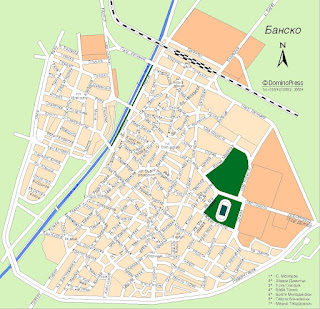
Map of Bansko
(click to enlarge)


Investments in Bansko
During the recent years a multi-million euros investment in a brand new skiing area has been made by Yulen (or Ulen), the company which has the licence to run the skiing area of the resort. Bansko has the best snow record and the longest ski season (15 Dec - 15 May) of all the Bulgarian ski resorts, where we may count other resorts like Borovets and Pamporovo-Chapelare.

View of Todorka Peak and Bansko Ski Resort

During the last couple of years, this resort is under a massive investment process with new hotels and resort facilities being under construction. A new resort area with luxury hotels and holiday apartments is being developed just opposite the Gondola lift, which also makes Bansko the resort having the best hotels. Due to the massive investments in hotels construction and to their multitude, there exists a local competition for accomodations, so you'll find a lot of good accomodation offers and services (see the Accomodation section below).


Access to the ski resort
The access from Bansko to the slopes domain is done by the exclusive 8-seats Gondola cabin lift by Dopplemayer.
Gondola is located in the S-S-W point of Bansko, at the end of the Pirin street which is also the most important street from the old Bansko town.
It has 2 stations, an intermediary one at Chalin Valog (1460m), where is assured the access to the Chalin Valog slopes, and the other one at Bunderitsa (1630m) with acces to the rest of the ski slopes.

Gondola Starting Station from Bansko (view from gondola)
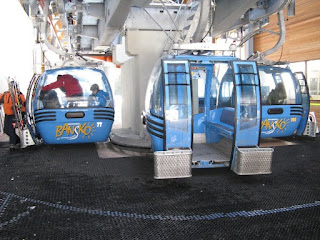

Gondola End Point at Bunderitza

Another way to access the ski slopes is by using the personal car on the road from Bansko to Bunderitsa. On this road, you have variants to Chalin Valog and Shiligarnik. The parking at Shiligarnik costs about 10 BGN ~ 6 euros.

The important thing is that you have to reach one of the 3 ski points of the resort:
1. Chalin Valog (1465m) - 2 ski tracks;
2. Bunderitsa (1635m) - Todorka and Tomba ski tracks;
3. Shiligarnik (1725m) - most of the ski tracks.

Bunderitsa (view from 6-Todorka ski track)


Shiligarnik (view from 12 ski track)


Ski Slopes
The ski slopes are located at approximately 10 km above the town on the northern slopes of Pirin, and are easily accessible for approximately 25 minutes ride on the new Gondola lift which starts from Bansko.
As the authorities say, they have 44 Technoalpine snow cannons which cover most of the slopes and make the ski season last longer; 12 Kassbohrer vehicles are used for slope maintenance purposes.

The prepared ski runs are all marked for the security reasons and they are stretched over 70 km. 25 km of high-capacity lift infrastructure stands for comfort and minimal waiting times.

Bansko Ski Map
(click to enlarge)


Difficulty scale
The distribution is as followed (see Bansko ski map):
- 30% Beginners (or blue slopes),
- 45% Advanced (or red slopes),
- and 35% Expert (or black slopes).

Ski-roads
Even the Bansko ski map presents a single ski-road, I consider there are 3 ski-roads that unify the Bansko slopes:
1. the main ski-road, from Bunderitsa to the town of Bansko (990-1630m), that has a length of approx 7km and is fully covered by snow cannons; this is the coolest way to get back to Bansko after a day on the ski slopes; it has also a variant to Chalin Valog's slope number 16, so the skier may choose between the 2 ways to get back to Bansko; the authorities try to make this ski-road more attractive by arranging big moguls on the way back.

View from Bunderitsa-Bansko Main Skiroad


View from Bunderitsa-Bansko Main Skiroad
(variant to Chalin Valog)

2. the Shiligarnik - Bunderitsa ski-road (1725-1635m) with a length of approx 2km, that links the 2 ski areas;

View from Shiligarnik-Bunderitsa Skiroad


View from Shiligarnik-Bunderitsa Skiroad (Bunderitsa, finish part)

3. the Shiligarnik - Chalin Valog ski-road (1670-1470m) with a length of approx 2km, that links the 2 ski areas;

Prepared ski slopes combinations
Next, I will try to detaliate some of the the best prepared ski slopes combinations on this map, based on their level of difficulty:
For beginners:
1. the easieast slopes are of course the 2 ski-roads, the ones between Shiligarnik - Bunderitsa and Bunderitsa - Bansko;
2. the blue part of Chalin Valog slope number 16 that is deserved by a baby ski-lift;
3. the Plato slopes number 3 and 11 on the ski map, deserved by 2 baby ski-lifts;
4. the most frequented combination for the beginners is: the blue part of 6 slope + the blue part of the 4 slope + the finnish part of the Shiligarnik-Bunderitsa ski-road; then is taken the 4-seat chair lift that climbs to the middle of the Tomba slope (9) ;
5. the number 5 ski slope deserved by a 4 seat chair lift; of course, a combination between 3, 11 and 5 is possible;
6. the 10 + 5 track combo deserved by the same chair lift;

View from the Top of Plato Slopes (3 and 11)


Plato Slopes 3 and 11


View of the Chalin Valog's Slope no 16 (blue part)


View of Slope no 5

For advanced skiers:
1. the full 10 slope; even it is marked as a blue slope, it has some areas that may be considered as red ones;
2. the 5 + 12 track combo that arrives somewhere below of Shiligarnik; a 4-seat chair lift deserves this combination;
3. the 10 + 12 track combo that arrives somewhere below of Shiligarnik; the same chair lift deserves this combination;
4. the 2 slope deserved by a 4 chair ski-lift;
5. the 8 slope deserved by a baby ski-lift;
6. the coolest ski slope for the advanced skiers: the 4 slope, or Balkaniada, deserved by the Poma 3-seat chair lift;
7. a combo track between 2 (Banderitsa) and 4 (Balkaniada), both red slope parts may be possible;
8. the 6 (Todorka) slope deserved by a 4 chair ski-lift;
9. a combo track between 2 (Banderitsa) and 6 (Todorka), both red slope parts may be possible;
10. the 7 slope deserved by a baby ski-lift;
11. a combination between 4 (Balkaniada), 6 (Todorka) and 7, all red slope parts may be possible;

View of Slope no 10


View from Slope no 10 (from bottom)


View from Slope no 12


View of Slope no 12


View from Slope no 4 (Balkaniada)


View of Slope no 4 (Balkaniada, at the left)
View of Slope no 6 (Todorka, blue part, at the right)


Main View of Slope no 4 (Balkaniada, from Shiligarnik)

For expert skiers:
1. the 2 (Banderitsa) + 6 (Todorka) + 9 (Tomba) track combo deserved by 2 * 4 chair ski-lift; the difficulty of this combination is given by the Tomba slope;
2. the 6 (Todorka) + 9 (Tomba) track combo deserved by a 4 chair ski-lift;
3. the Chalin Valog slope number 15 deserved by a 4 chair ski-lift; even if marked as red, this slope has black areas;
4. the 9 (Tomba) slope deserved by a 4 chair ski-lift;
5. the upper part of Chalin Valog number 16 slope deserved by a 4 chair ski-lift; this area of the 16 slope has the biggest elevation from the prepared Bansko slopes.

View from Slope 9 (Tomba)


View of Slope no 9 (Tomba, from Bunderitsa)


View of Chalin Valog's Slope no 16 (black part)


Freeride and powder
The fans of extreme winter sports will enjoy also the fun park and the half pipe.
There are various opportunities for the freeride and expert skiers, but they are not encouraged by the authorities when the risk of avalanches exists:
- ski trees at the margin of prepared ski slopes;
- ski trees, moguls and powder under the ski lifts;
- ski trees and powder between the Balkaniada slope and the 10 slope, on the so called Tchashata area;
- ski trees and powder at the west of Todorka peak, where you should go only with a guide because of the highest risk of avalanches (see image map);

Map with the Freeride Dohnhills at the West of Todorka Peak

Other considerations
The program on all the ski domain is from 8.00am to 4.30am. After the program, the slopes are maintained and re-tracked.
It may be noticed that the 13 numbered slope doesn't exist, maybe this is for the skiers to have luck :).
On other Bansko maps, the 15 slope is denoted 17.
Also, the 14 slope is not opened yet, but there exist plans for this slope to work; in the past, the 14 track was denoted "Academica" and was practiced by students and also there exists a student challet on this slope.
On other Bansko ski maps, the skiroad from Bunderitsa to Bansko is denoted as skiroad 1 and the one from Shiligarnik to Bunderitsa is denoted as skiroad 2.

The longest possible track combo on the ski runs makes a 16 km downhill race.


Ski Lifts
On the mountain there are about 25 km of ski lifts that assure the access to the slopes:
- 6 four-seat chair lifts by Dopplemayer: 1 at Chalin Valog, 3 at Bunderitsa (1 of them at 2450m), 2 at Shiligarnik;
- 1 tree-seat chair lift by Poma, from Shiligarnik to the Todorka peak;
- 3 anchor type tow lifts (Shiligarnik area),
- 3 single tow lifts (Chalin Valog and Shiligarnik areas),
- and 10 children dragger (Bunderitsa area).
All ski equipment can be used by one chip-card from SkiData.

Chairlift End Station (at 2600m)


View of a Chairlift

You may get a valid ski-pass for 1/2, 1, 2, 3, 4, 5, 6, 9, 13 days; also, the seasonal ski-pass is possible.
The 1/2 ski-pass is valid from 0.30pm to 4.30pm.
The ski-pass office program is from 8.00am to 5.00pm with a small break around 0.00pm.
Ski-pass prices here: http://www.banskoski.com/?language=en&page=pricing&sub=lifts-pricing


Apres ski and ski bars
There are 3 main areas where you can get a break and drink or eat on the ski domain:
1. at Bunderitsa;
2. at Shiligarnik: Todorka restaurant, Bla Bla ski bar, aso; Shiligarnik is the main apres ski area;
3. at 2400m, at the end of the Plato ski slopes: The Goat ski bar; in 2009, here it was also present another ski bar, but I found it burned in 2010.
The prices vary, for example a coffee or a hot chocolate costs between 3 and 5 BGN ~ 2-3 euros, a Coca-Cola costs 5 BGNs, aso.


Other ski services
The wardrobes are located at the lower and upper Gondola lift stations and they are best equipped with everything ski and snowboard you may need; the authorities say they have - 3500 pairs of Atomic ski, Salomon and Volkl ski pairs and more than 670 Atomic boards of all sizes.
Prices here: http://www.banskoski.com/?language=en&page=pricing&sub=wardrobe-pricing

The ski school is one of the best ski schools in Eastern Europe assuring professional guidance at the level of group or individual exercises.
Prices here: http://www.banskoski.com/?language=en&page=pricing&sub=school-pricing

Nursery and health assurance are included in the ski-pass.
Ski-pass prices here: http://www.banskoski.com/?language=en&page=pricing&sub=lifts-pricing

A repairing shop is located in the Gondola lift’s Basic station. Working time is from 8am to 5pm.
Prices here: http://www.banskoski.com/?language=en&page=pricing&sub=repair-pricing


Accomodation
You may choose from various offers as Bansko has a lot of accomodation places, starting from 2 star family hotels to luxury hotels with all inclusive. Bansko has also a 5 star hotel.
When you make the reservation, you have to be sure the chosen hotel has a parking place, as many of them don't have. Most of the hotels assure free transfer to gondola station and back. If your hotel do not assure this transfer, then you should know that a parking place at the gondola station costs about 8 BGN ~ 5 euros a day.
It is recommended that you arrange your hotel before you go to Bansko, as the resort is quite busy during the winter.
Accomodation can be established also here:
http://www.booking.com/
http://www.bulgariaski.com/bansko/bansko-hotels.shtml


Night life
After an adventurous day on the ski slopes, Bansko guests enjoy the local restaurants called the Mehanas, serving from traditional Bulgarian cuisine and drinks to international delights. Most of the Mehanas are located on the Pirin street which for the tourists represents the main street.

Night View of Pirin Street


Night View of some Mehanas in Bansko


Night View of Ethno Restaurant (Mehana) on Pirin Street

If you go to Bansko, then you must taste the kawarma kebap speciality; you may also choose between the bulgarian beers like Pirinsko, Kamenitza and Zagorka.

Kamenitza, Zagorka and Pirinsko

The Mehanas employees try to cover a variety of foreign languages that are spoken by the tourists of Bansko, such as: english, greek, romanian, russian, french, german, aso. The same effort is made by the hotels staff, so for the tourists is easy to conversate, expose their wishes and make them understandable.
A modern ice rink with evening program is also available near the gondola station.

The Ice Rink

In 2009, there were also 2 bowling halls and several pool halls.
Discos and night clubs work without time limit, and usually close early in the morning.
The people of Bansko are famous with their hospitality and friendliness.


Other things to know
There are 2 central pharmacies located on the Pirin street; of course, there are many others in Bansko. Bulgarian word for pharmacy is apteka.
Other bulgarian expressions:
"good morning" = "dobro utro"
"good afternoon" = "dobar den"
"good evening" = "dobro vecher"
"yes" = "da"
"no" = "ne"
"I don't understand" = "ne razbiram"
"how much" = "kolko".

There are many banks in the old center of Bansko, near the tower, that offer you a correct price for euro, when you want to exchange for BGNs. You may find almost everything in Bansko, only the prices differ.
An Outdoor Shop in Bansko

The gas stations are located at the Bansko entry from Razlog.

Even if Bulgaria is an EU country, for the moment the internal payments are done in BGN (or leva). At this moment, 1 BGN is approx 53 euro-cents, but you should check the exchange course before reserving your accomodation.


Future plans for Bansko ski resort
The Yulen (Ulen) company intends to build a secondary gondola, starting from Bansko to the base of the 14 slope, as the actual gondola is obviously overloaded. So, soon, "Academica" ski track will work again.
Also, there are big plans for the village located at 5km east of Bansko, named Dobrinishte; here, even if already exists a long ski track, it will soon be built another big ski domain of about 40km, which will be linked to the actual domain of Bansko with the help of another gondola.


Roads to access to Bansko
1. From Belgrade (Serbia) on the highway to Nis (Serbia), pass the border to Bulgaria at Dimitrovgrad, then Sofia, Pernik, Blagoevgrad, Simitli, Bansko;
2. From Skopje (Macedonia) on the highway to Titov Veles (Macedonia), then pass the border at Delcevo (Macedonia), then Blagoevgrad, Simitli, Bansko;
3. From Thessaloniki (Greece) to Serrai (Greece), pass the border at Promachonas (Greece) / Kulata (Bulgaria), then Simitli, Bansko;
4. From Istanbul (Turkey) to Edrine (Turkey), then Kaskovo (Bulgaria), Plovdiv, Velingrad, Bansko;
5. From Bucharest (Romania), pass the border at Giurgiu (Romania) / Ruse (Bulgaria), then Byala, Pleven, Sofia, Pernik, Blagoevgrad, Simitli, Bansko;
6. From Craiova (Romania), pass the border by ferry-boat at Bechet (Romania) / Oriahovo (Bulgaria), then Vratsa, Sofia, Pernik, Blagoevgrad, Simitli, Bansko;
Roads in Bulgaria are quite good, you are adviced to get a GPS with you, but don't forget also a roadmap.


References
1. Official Bansko site, http://www.banskoski.com/?language=en
2. Bulgaria ski site, http://www.bulgariaski.com/bansko/
3. Romanian Skivirus forum, http://www.skivirus.com/